Daily Summary
The Daily Summary provides a breakdown of wildlife activity for a selected date.
It can be opened by selecting a date using the calendar picker at the top of the WAMF interface.
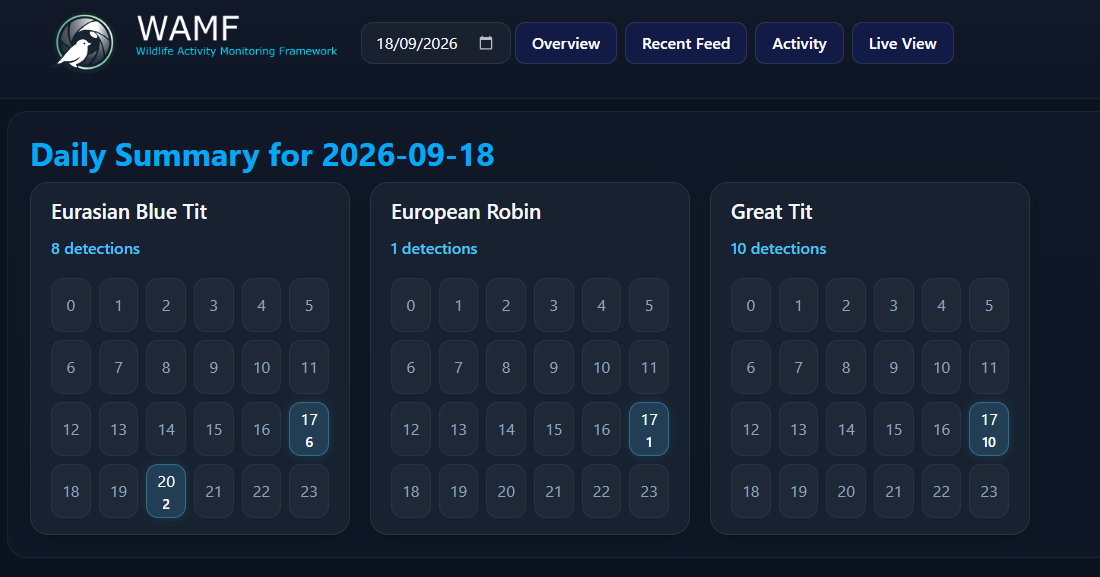
Selecting a Date
Use the calendar picker at the top of the WAMF interface to select the date you want to review.
WAMF displays a Daily Summary containing the species detected on that date.
Species Activity
Each species detected during the selected day is displayed separately.
The species summary shows:
- common species name
- total number of detections
- activity for each hour of the day
Hourly Activity
Each species includes a 24-hour grid covering hours 0 through 23.
Hours containing detections are highlighted and show the number of detections recorded during that hour. Hours without recorded detections remain unhighlighted.
Select a highlighted hour to view the individual detections recorded for that species during that hour.
Viewing Detections by Hour
Hours containing detections are interactive.
Select a highlighted hour to open the Detections by Hour view for that species and hour.
The page shows the individual detections recorded during that period, making it possible to move from the daily activity summary to the detections behind the count.
Comparing Species
Because each detected species uses the same 24-hour layout, the Daily Summary can be used to compare activity patterns across species for the selected date.
For more detailed information about an individual species and its detection history, see Species.